
Budget Calendar
MiShell Software SystemsFinance
4.8189.00 Reviews
- Version
- 1.69
- Installs
- 10.00K
- Age Rating
- Everyone
Screenshots
Our Review of Budget Calendar
 Analysis by Appyee
I tend to stick with a budgeting tool only when it makes a repeated task easier, not merely when its layout looks appealing on the first day. Budget Calendar puts dates at the center of money planning, which makes it most useful when I want to see how bills and income line up across a month. That focus gives it a practical first-week appeal, but the lasting value depends on whether I’m willing to keep its entries current.
Who benefits from seeing money by date
This is a finance app from MiShell Software Systems, and its calendar approach suits people who think in paydays, due dates, and upcoming commitments rather than broad monthly totals. If a tight week matters more to you than a month-end summary, laying transactions out by date can make the pressure points easier to notice. I’d particularly consider it if you have several recurring bills or income dates to coordinate.
It is less compelling for someone who wants to connect an account and have a budget build itself with almost no attention. Calendar planning asks you to make choices about what belongs on the schedule and to revisit those choices as life changes. That extra involvement can be useful for awareness, but it is still work. If you mainly want a quick snapshot of spending categories, a conventional budget tracker may suit you better.
A first week that rewards a little setup
The first useful step is not entering every small purchase. I’d start with the dates and amounts that shape the month: expected income, regular bills, and known commitments. Once those are visible together, the calendar can reveal whether a large payment lands before or after money comes in. That is a more actionable starting point than filling in categories without knowing when cash is actually available.
For example, imagine payday arrives after rent and a utility bill are due. A monthly total might suggest the budget works, while a dated view makes the short gap obvious. I would use that cue to plan ahead—perhaps by holding part of the previous pay aside—rather than treating the forecast as permission to spend. The calendar helps organize a decision; it cannot make the decision for you.
What keeps it useful from month to month
The app’s lasting value is tied to recurring planning, not novelty. Repeated bills and income give the calendar a structure you can review as the next month approaches. I’d make a brief routine of checking upcoming dates after payday and adjusting entries when a known expense changes. That small review is where a visual plan can remain relevant instead of becoming an attractive record of an outdated month.
There is also a useful distinction between planned and actual spending. A calendar entry can remind you what you expect to pay, while a transaction record helps you understand what you did pay. Keeping those roles clear makes the plan more honest: a forecast is a guide, not a promise that the balance will match exactly. For irregular costs, I would add them when they become reasonably predictable rather than pretending every future expense is already known.
Your Financial Life, Simplified
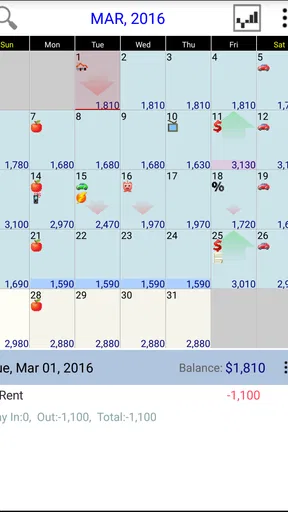
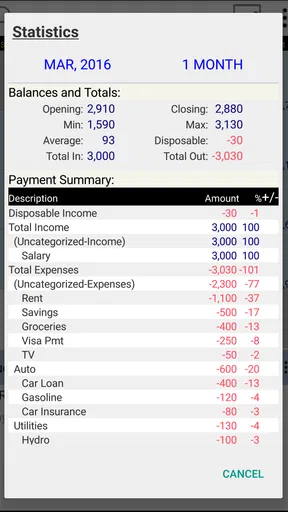
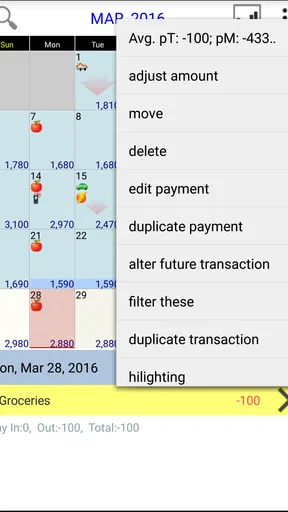
First things first, Budget Calendar is not your typical budgeting app. Instead of a spreadsheet-like interface, it visualizes your finances on a calendar. Yes, you read that right! You can actually see your income, expenses, and upcoming bills in a calendar format, making it easier to plan ahead. This feature alone is a game-changer for visual learners like myself. It’s like having a personal financial assistant right in your pocket.
Getting Started
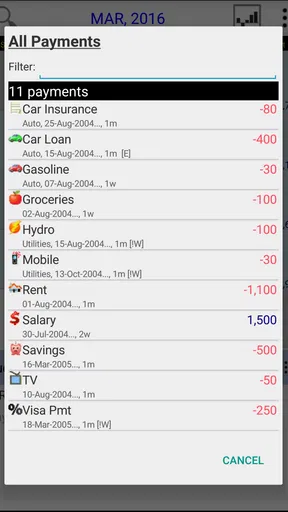
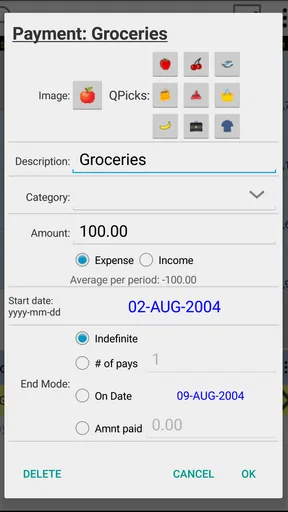
Setting up the app is a breeze. Once you download it from your preferred app store, you’ll be prompted to enter some basic details. You can add your income sources, recurring bills, and any other expenses you foresee. The app even lets you categorize these expenses, which is super handy for those of us who want to see where our money is actually going.
The interface is intuitive and user-friendly, which is perfect for someone like me who doesn’t want to spend hours figuring out how to use a new app. Plus, the calendar view is customizable, allowing you to choose colors and themes that suit your style. I went with a calming blue theme, which somehow makes budgeting feel less stressful.
Tracking and Alerts
One of the standout features of Budget Calendar is its alert system. You can set up reminders for due dates, which is a lifesaver if you’re prone to forgetting when your bills are due. The app sends you notifications, ensuring you never miss a payment again. I found this particularly helpful when juggling multiple bills at once.
Tracking expenses is also straightforward. You can log transactions manually, or, if you're feeling fancy, connect your bank account for automatic updates. This feature is really neat because it provides a real-time view of your spending, helping you stay on top of your financial game.
Planning Ahead
If you love setting financial goals, you’ll appreciate the app’s planning tools. You can set monthly budgets for different categories and monitor your progress throughout the month. I set a goal for dining out (because who doesn’t love a good meal?), and the app kept me in check by showing how close I was to exceeding my budget. It’s a subtle yet effective way to encourage smarter spending habits.
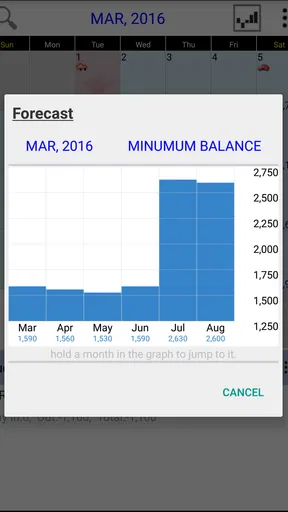
Another cool feature is the ability to forecast your finances. By entering future income and expenses, I could see how my bank balance would look months down the line. This forecasting tool is perfect for planning big purchases or saving for that dream vacation.
Keeping the routine manageable
To keep maintenance from taking over, I’d treat the calendar as a planning surface rather than a demand for perfect bookkeeping. Enter stable items first, then add variable costs when you know enough to make a useful estimate. A grocery run planned for a particular day may not match the final receipt; the important question is whether that cost changes the rest of the month’s choices. Updating only meaningful differences can make the habit sustainable.
Manual entry has a clear trade-off: it asks for attention, but it also makes spending harder to ignore. Automatic bank updates, where available and chosen, can reduce routine typing, though I would still review transactions rather than assume every entry belongs in the right category or date. For a shared household, it is worth agreeing who maintains the plan; otherwise, one person may be looking at a calendar that does not reflect the other person’s purchases.
When a calendar helps—and when it gets tiring
Compared with a spreadsheet, the calendar is easier to scan for timing conflicts and less suited to building elaborate custom calculations. Compared with a category-first spending app, it puts cash flow and due dates in the foreground rather than making category totals the main event. Neither approach is universally better: I’d choose this one for date-driven planning, but choose a detailed spreadsheet or a reporting-focused tracker if I wanted to analyze spending patterns across many months.
The likely source of fatigue is upkeep. A missed purchase or an income date that shifts can make a future balance look more reassuring than reality. Reminders can help with scheduled bills, but they do not replace checking whether the amount or timing has changed. I would also avoid treating a long-range forecast as precise; it is most useful as an early warning that a month may be tight, not as an exact prediction of what will remain in an account.
Price, compatibility, and practical fit
The app costs $4.95, carries an Everyone age rating, and has a 4.8 average from 472 ratings, with 184 written reviews. It has 10K+ installs. Those figures suggest it has found an audience, but I would weigh the purchase against how often I expect to use its calendar view. The current version is 1.68, and it was released on May 17, 2013; it requires OS 7.0 or later. That makes checking device compatibility a sensible first step, especially if you use older hardware.
One practical question is whether this is useful without linking a bank account. Yes: the calendar can still help if you enter income, bills, and spending yourself, though that means the plan depends on your updates. Another is whether it replaces a bank’s balance screen. I wouldn’t use it as a substitute for checking the actual account; I’d use the calendar to anticipate commitments, then confirm available funds with the bank before a large or time-sensitive payment.
Final Thoughts
So, is Budget Calendar worth your time? If you’re looking for a budgeting app that combines ease of use with powerful features, I’d say it’s definitely worth checking out. It takes the stress out of financial planning, and the calendar view makes it all the more engaging. Whether you’re a seasoned budgeter or just starting out, this app could become your go-to tool for managing money.
Ultimately, the app's strength lies in its ability to provide a clear, visual representation of your financial life. So why not give it a try? You might just find yourself looking forward to budgeting a little bit more.
My longer-term test would be simple: after the initial setup, does checking the calendar become part of a routine you already have, such as reviewing bills around payday? If it does, the date-based view can earn its place by helping you spot awkward timing before it becomes a scramble. If you stop updating it, the same calendar can quickly become less dependable than a basic bank balance and a short list of due dates.
I’d recommend it most to someone who wants a visible month plan and is comfortable maintaining a few important entries. I’d skip it if I wanted budgeting to happen entirely in the background, or if my main goal were deep reports rather than planning around dates. Its $4.95 price makes sense when the calendar changes how you make everyday decisions; the best reason to keep it is not that it looks different, but that it helps you notice what is coming before you commit money elsewhere.
Verdict
Strengths of Budget Calendar
- Intuitive interface makes budgeting easy.
- Syncs seamlessly across devices.
- Customizable reminders for bills.
- Supports multiple currencies.
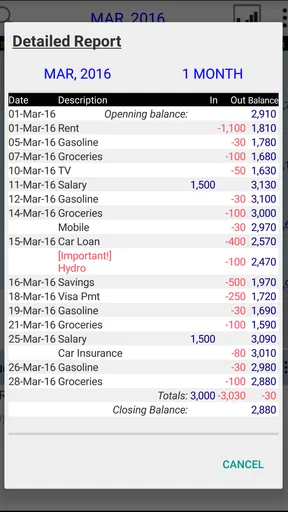
- Detailed visual financial reports.
Limitations of Budget Calendar
- Limited free version features.
- No offline mode available.
- Occasional sync delays reported.
- Lacks investment tracking options.
- Ads can be intrusive at times.
Similar Picks in This Category
View All
Google Wallet
Google LLC4.3

Airtel: Recharge, Bank & Loans
Airtel4.0

PayPal - Pay, Send, Save
PayPal Mobile4.2

DANA Indonesia Digital Wallet
PT Espay Debit Indonesia Koe4.5

Binance: Buy Bitcoin & Crypto
Binance Inc.4.8

Cash App
Block, Inc.4.7
Frequently Asked Questions
What is Budget Calendar and how does it work?
Budget Calendar is a financial management app designed to help users track their income, expenses, and savings in a visually intuitive calendar format. It allows you to schedule and monitor financial activities, set reminders for bills, and view your overall financial health at a glance. The app provides both monthly and annual views to ensure comprehensive financial planning.
Is Budget Calendar available for both Android and iOS devices?
Yes, Budget Calendar is available for download on both Android and iOS platforms. Users can find it on the Google Play Store and the Apple App Store. The app is designed to work seamlessly across different devices, ensuring that your financial data is synced and accessible wherever you are.
Does Budget Calendar offer any security features to protect my financial data?
Budget Calendar prioritizes user privacy and data security. It employs encryption to protect your financial information and offers features like password protection and biometric login (such as fingerprint or face recognition) on supported devices. This ensures that your sensitive information remains secure and accessible only to you.
Are there any costs associated with using Budget Calendar?
Budget Calendar offers a free version with basic features that allow users to manage their finances effectively. However, there is also a premium version available through a subscription, which provides additional features such as advanced analytics, customization options, and ad-free experience. Users can choose based on their needs and budget.
Can I customize the categories and notifications in Budget Calendar?
Yes, Budget Calendar allows users to customize categories to better fit their unique financial habits and goals. You can also set personalized notifications and reminders for upcoming bills, expenses, and income. This level of customization helps users maintain control over their financial planning and stay informed about important financial events.
